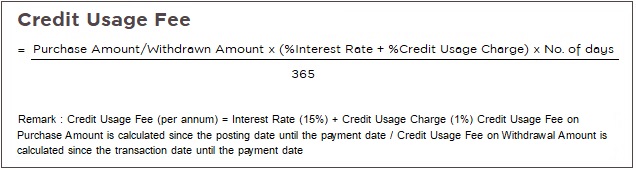
When the cardholder receives the billing statement, please make payment within the due date specified in the billing statement. Payment options are as follows:
1. Bank Counter Pay
The cardholder can make payment by cash or cheque, using payment form with barcode (form attached with billing statement). The cheque should be crossed and made payable to Bank of Ayudhya. Please indicate your name, surname, and credit card account on the reverse side of your cheque.
| • Bank of Ayudhya |
| • Bangkok Bank |
| • KrungThai Bank |
| • Siam Commercial Bank |
| • Kasikorn Bank |
2. Direct Debit from your bank account at Bank of Ayudhya
For cardholders who hold Current or Savings account at Bank of Ayudhya, simply ask for Direct Debit application.
| • To enroll, please complete direct debit application form and send to Bank of Ayudhya Public Company Limited at your branch account. |
| • When the payment due date arrives, the company will automatically deduct the amount from the bank account (please deposit money into your bank account 1 day in advance to ensure sufficient fund). |
| • Payment with direct debit facility, the cardholders will receive the billing statement in advance like other payment methods. |
• If the cardholder wants to change payment term, please contact Krungsri Credit Card Call Center
- Krungsri Visa Platinum call center 0 2646 3555
- Krungsri Corporate Credit Card call center 0 2646 3333
- Krungsri Credit Card and HomePro Visa call center 0 2646 3000 |
| • The direct debit takes effect when your billing statement shows your bank account number. |
3. Via Bank of Ayudhya’s ATM
The cardholder can make payment with Krungsri ATM Card or Krungsri Debit Card. The outstanding amount will be deducted from your bank account at Bank of Ayudhya.
4. Transfer Payment via
www.Krungsrionline.com and Krungsri Mobile Application (KMA)
Krungsri Online Service enables 24-hour flexibility to pay your bills online with credit card payment. This helps the cardholder to pay bill anytime 24 hours a day 7 days a week.
Steps in applying for Krungsri Online
| • To apply the service, applicant must have either current or saving accounts registered at Bank of Ayudhya at any branch |
| • Complete the application form provided on the Krungsri Online homepage. Choose your own User ID and Password to access Krungsri Online. The application form is also available at all BAY’s branches, |
| • Verify your personal data, and print and sign the application form along with the terms and conditions on the application form. The signature must be similar to the signature given when opening the account. |
| • Mail the application form along with a signed photocopy of your identification document to the branch hosting your account within 30 days from the applied date. |
| • The bank will send a notice of access to Krungsri Online Service via postal mail within 7 business days (for applications sent to the account hosting branch). 7-14 business days processing time is required for applications submitted to non-account hosting branches. |
5. Cash Payment at “PAY AT POST”

Use payment form with barcode (form attached to billing statement). The payment is limited up to 50,000 Baht per transaction per Post Office. Service fee is 10 Baht/transaction nationwide. The cardholders should keep the receipt as a reference.
6. Cash Payment at Counter Service
Simply notice the following signs

| • 7Eleven nationwide (24 Hours) |
| • Department stores e.g. Robinson, The Mall, Jusgo, Tung-Hua-Seng and Big C. |
| |
Simply use payment form with barcode (form attached with billing statement). The cardholder can make payment by cash at any Counter Service. The payment is limited to 30,000 Baht per transaction per Counter Service. Please keep the following documents as a reference:
| 1. The credit card payment receipt |
| 2. The counter service receipt (service fee is 15 Baht/transaction nationwide. The fee is inclusive of VAT) |
7. Pay via Lotus’s Customer Service Counters 
Simply use payment form with barcode (form attached with billing statement). The cardholder can make payment by cash at Lotus’s Customer Service Counters. The payment is limited to 49,000 Baht/transaction. Service fee is 10 Baht/transaction nationwide. The cardholder should keep the receipt as reference.
8. Pay via mobile phone by True Money or mPAY
The payment is limited to 30,000 Baht/transaction. Service fee is 10 Baht/transaction nationwide. (True Move customers call 1331 # 6) (AIS customers call 1175)
9. Pay via mPAY Station counters 
Simply use payment form with barcode (form attached with billing statement). The cardholder can make payment by cash at any mPay Station Counters. The payment is limited to 50,000 Baht/transaction. Service fee is 10 Baht/transaction nationwide. The fee is inclusive of VAT


.png?lang=en-US&ext=.png "Logo")










.png?lang=th-TH&ext=.png)